
CactusBrain Vision
On-device object detection, OCR and face primitives for iOS and Android. Images never leave the device: CactusBrain does not offer cloud inference and cannot receive the content you process.
How it fits together
You integrate CactusBrain Vision. It resolves and loads models through its bundled native runtime on your behalf, so there is no separate engine to install, link or keep in step with the SDK.
Models are not bundled into your application. The SDK asks CactusBrain which artifact your project is entitled to, downloads it once, verifies it, and installs it locally. Everything after that is local.
Working with faces
Faces are four separate models, downloaded separately and run separately. They are deliberately not one "face verification" feature: bundling them would mean an app that wants to blur faces in a photo also ships a spoof detector and an identity comparator it never runs, and would make a privacy claim on your behalf that we cannot keep.
- Detect — where the faces are. Two checkpoints, below.
- Liveness — whether a detected face is a real person or a picture of one.
- Embed — turn one face into a vector.
- Compare — score two vectors against each other.
Detection comes first: the other three all take a face box as input, so nothing runs until something has found one. The figures below are real output, not mock-ups.
Detection: two distances, not two quality levels
The close-up and distance checkpoints see a 128×128 and a 256×256 version of your image respectively. That is the whole difference, and it decides which one you want: a face that is a small patch of a wide shot does not survive being squashed to 128 pixels.
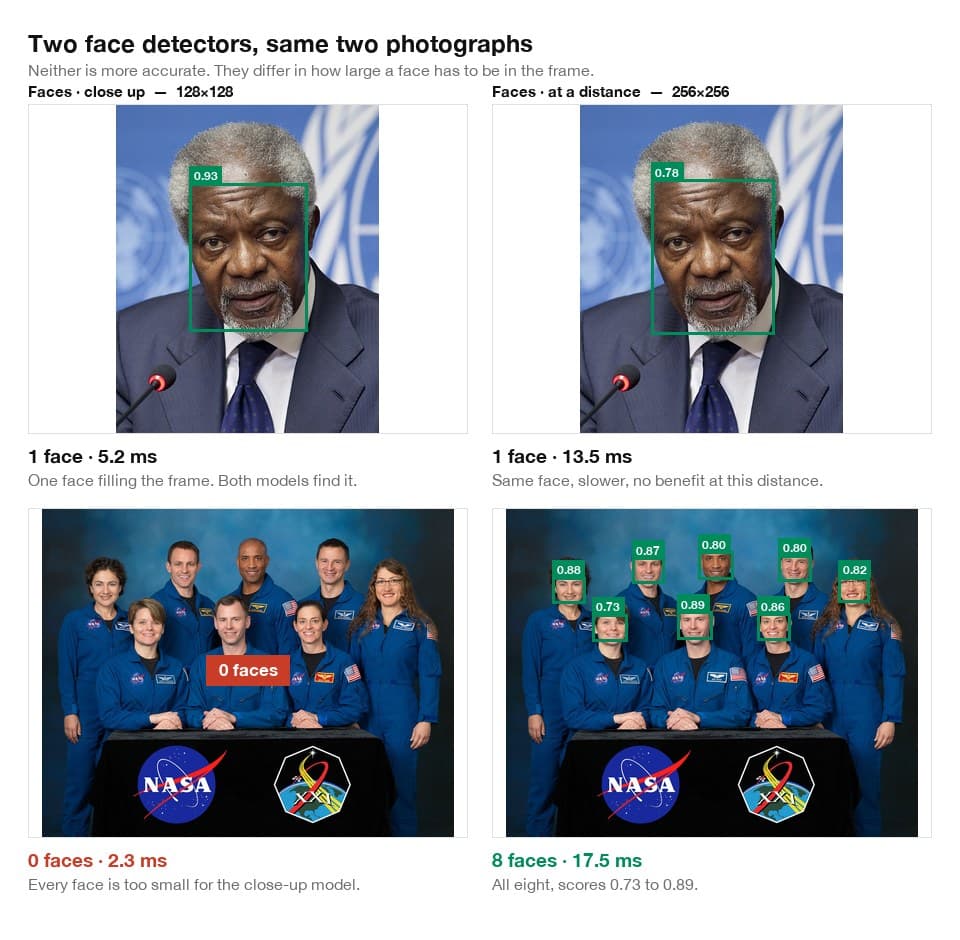
0 of 8 faces in the group shot. The distance model finds 8 of 8. Neither is better — pick by how large the faces are in frame.Photographs: US Mission in Geneva (public domain); Robert Markowitz / NASA (public domain).Liveness: three probabilities, no built-in threshold
Passive liveness answers whether the camera is looking at a person or at a picture of one. It returns all three probabilities — live, print attack, replay attack — rather than a boolean, because live 0.51 and live 0.99 are different situations and only your application knows which of them should pass.
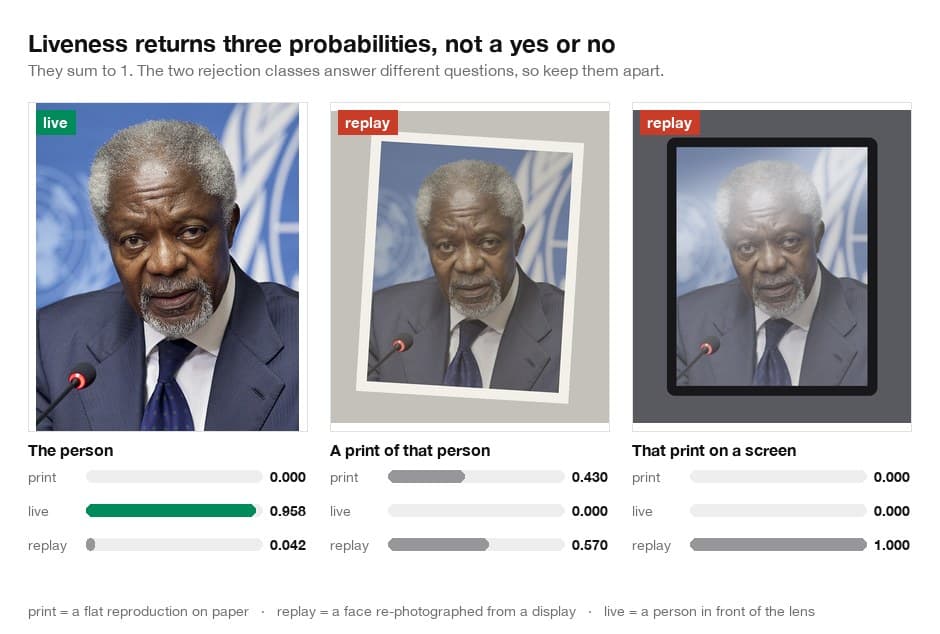
0.958 for the photograph, 0.000 for the print and for the print re-shot on a screen. There is no default threshold in the SDK: isLive(threshold:) requires the number, because what passes for unlocking a photo album should not pass for authorising a payment.Photograph: US Mission in Geneva (public domain). Print and screen presentations produced for this figure.Comparison: read the score against the same model
Comparison is two calls — embed each face, then score the two vectors. The score is a cosine similarity, so it is meaningful only against vectors from the same checkpoint: the compact model produces 128 numbers and the accurate one 512, and a similarity between them would be arithmetic rather than an answer. Both models expect the face squared up on the eyes, nose and mouth, and the SDK does that warp for you from the keypoints the detector returns.
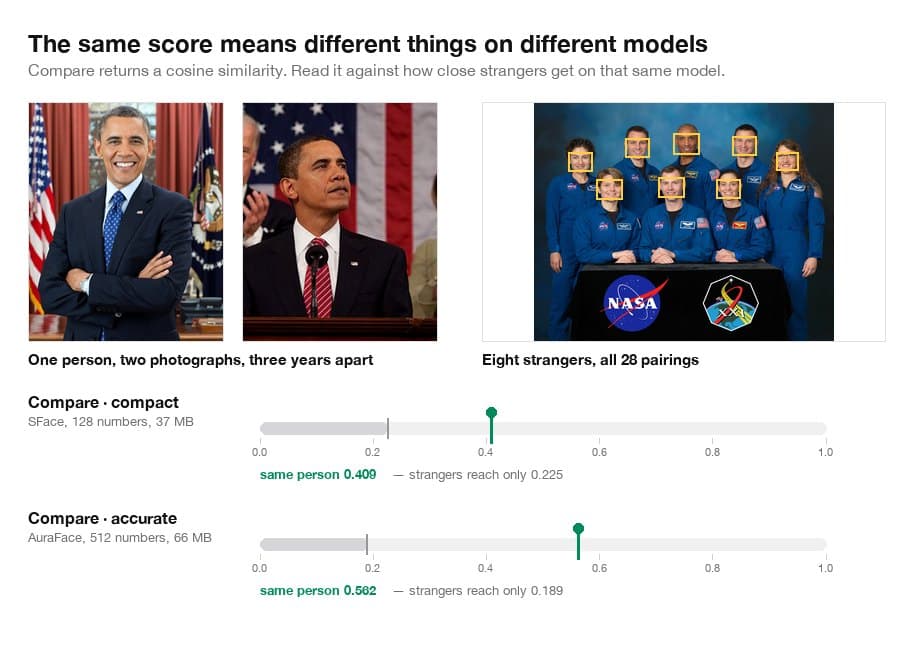
The margins above come from a handful of pictures under good light. Your cameras, your lighting and your population will move them, and a threshold read off this figure will be wrong somewhere it matters. Measure on your own images before you pick one — and prefer the accurate model when the answer carries consequences, because its wider margin is what absorbs the cases you did not measure.
There is no gallery, no index and no search. Comparison is pairwise and stateless: you hold both vectors, and the SDK never stores one. An embedding is biometric data, and where it may be kept is a decision your jurisdiction makes, not a convenience we should make easy by accident.
Requirements
- iOS: iOS 17 or later, built with Xcode 26. Device and simulator are both arm64; there is no x86_64 simulator slice, so an Intel Mac cannot run the simulator build.
- Android: API 24 or later, compiled against API 36 with JDK 21. The native runtime is built for
arm64-v8a, so an x86_64 emulator will not run it.
The SDK reports the engine version, model format version and ABI version it is running against. An artifact your project is entitled to but your installed runtime cannot load is refused at resolve time, before the download starts, rather than failing after a large transfer.
Choose a platform
Current version: 0.1.0.
Each guide covers requirements, installation, project key setup, model preparation and the first local inference:
Project keys
A project key identifies your project so CactusBrain can decide which models it may download. Create one from your project's Quickstart in the dashboard. It is shown once and stored only as a hash, so a lost key is rotated rather than recovered.
A live key begins cb_live_. A diagnostics key begins cb_diag_and is rejected by the model routes by design — it reports telemetry and nothing else.
Assume anyone can extract it from a shipped app; that is expected and does not by itself grant access to any model. The key names your project, and the server decides entitlement. Keep it out of source control anyway, so that rotating it does not require a code change and so abuse can be attributed to a single key.
How model delivery works
- Your app calls
preparefor a capability. - The SDK asks CactusBrain to resolve an artifact for your project and platform.
- CactusBrain checks the project key, the project's entitlement for that model, the account's status, runtime compatibility, and delivery policy.
- If all of those pass, it issues a short-lived authorisation scoped to that one artifact.
- The SDK downloads the encrypted artifact, verifies it, decrypts it and installs it.
Every one of those checks happens on the server. A modified client can change what its own UI believes, but it cannot produce an entitlement, mint an authorisation, or reach an artifact it was not granted.
Offline behaviour
Once a model is installed, inference runs with no network connection. The SDK does not contact CactusBrain per inference, and there is no heartbeat or license check on the inference path — an app in airplane mode keeps working.
The network is needed to install a model, to upgrade to a newer version, and to install on a new device. If a model is not installed and the device is offline, preparereports that it is unavailable rather than failing silently.
Rotation and revocation
Revoking a project key stops it resolving new models and invalidates outstanding download authorisations. Apps already holding a valid key continue to work until their key is replaced.
Revoking a key does not delete models already installed on end users' devices. Those files are on hardware you do not control. Revocation governs future access — new downloads, new versions, new devices — and we would rather state that plainly than imply a remote kill switch that does not exist.
Errors
Delivery failures are distinguishable so your UI can respond usefully rather than showing one generic message:
- Entitlement denied — the project has no entitlement for that model. Retrying will not help.
- Network failure — transport failed. Retrying is reasonable.
- Integrity failure — the artifact did not verify. It is discarded rather than installed.
- Unsupported runtime — the device or engine cannot load that artifact.
- Cancelled — your app cancelled the preparation.
Resolve returns the same response for "not entitled" and "no artifact published for this platform". That is deliberate: it stops the API being used to enumerate the catalogue. If you expect an entitlement and see a denial, check the project's entitlements in the dashboard.
Sample application
A complete sample for both platforms — detection, OCR, embedding and chat, with the full preparation lifecycle and every failure path surfaced in the UI:
The sample resolves the SDK from its published package, so it builds from a clean checkout without any CactusBrain source.
Release notes
0.1.0
First developer release. Object detection and OCR on iOS and Android, with server-enforced model delivery, artifact integrity verification and offline inference.
These docs describe version 0.1.0. Examples here do not rely on unreleased APIs.